How to use DaGaMa ExpenseBot: snap receipts, log expenses, and ship a clean report — the complete guide.
ExpenseBot turns every receipt you collect during business travel into a categorized expense row in your Google Sheet — within seconds, from any device, in any currency. Snap the receipt. Speak the context if you want ("client lunch with Nova Labs"). Done. ExpenseBot reads the date, vendor, amount, currency, tax, and category, converts to your home currency at the day\'s rate, and stamps the row with the trip you tagged. By the time you land, the expense report is half-written.
Last updated 2026-09-03 · DaGaMa Intelligence · ~12 min read
How to capture receipts during business travel and have them categorized automatically.
Outcome: every receipt you photograph becomes a structured row in your Google Sheet with vendor, date, amount, currency, tax, and category — in roughly 10 seconds per receipt. Works on crumpled paper receipts, PDF emails, and screenshots from delivery apps.
Best for: trade-show trips, sales travel, conference attendance — anywhere you accumulate receipts faster than you have time to file them.
Open ExpenseBot in any of four channels.
Snap the receipt — photo or PDF.
Confirm or correct by reply.
Keep work and personal apart with /context.
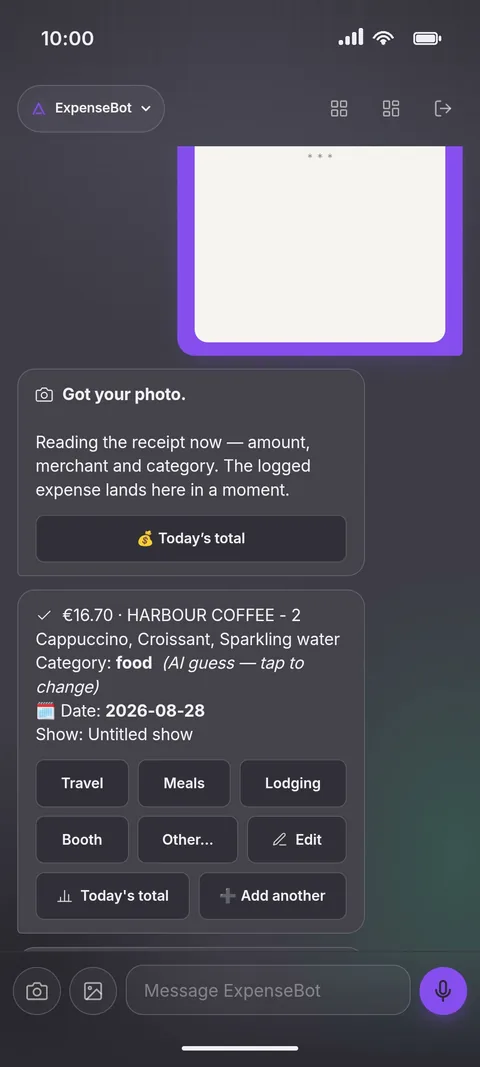
Real captures from the DaGaMa app. All companies, contacts, and amounts shown are fictional demo data.
Mockups above approximate the ExpenseBot experience across channels. Email addresses and sender names are blurred for privacy.
Frequently asked questions.
What receipt formats does ExpenseBot read?
Paper receipts (thermal-printed, ink-printed, hand-written), PDF receipts emailed from vendors, screenshots from delivery apps (Uber Eats, Grab, Meituan, Didi), restaurant QR-code receipts, and any clean photo of a printed total. The bot uses DaGaMa Intelligence's vision model so accuracy holds across non-Latin scripts (Japanese, Chinese, Korean, Arabic, Hebrew, Russian).
Does ExpenseBot handle multi-currency travel?
Yes. The bot reads the source currency from the receipt, fetches the day's exchange rate to your home currency, and stamps both numbers on the row. Reports group expenses in either currency, your choice. Useful for trips that span multiple countries — one click toggles between source-currency view and home-currency view.
Can ExpenseBot integrate with QuickBooks or Xero?
Indirectly today: the CSV export uses standard headers (date, vendor, category, amount, currency, tax, trip) that QuickBooks Online and Xero both accept on import. Native API integration is on the roadmap. Most users export the CSV at trip-end and upload to their accounting tool in one step.
What happens to my expense data if I cancel?
Your Google Sheet stays shared with you. ExpenseBot writes to a Sheet shared with you with edit access, and it stays shared after any cancellation. Receipt photos in the Drive folder shared with you also stay. The bot stops capturing new expenses; the historical data remains accessible.
Is ExpenseBot covered by the BoothBot or SourceBot subscription?
Your first month is included as a gift the moment you make your first BoothBot or SourceBot capture. After 30 days it auto-converts to a paid subscription at the standard rate. Cancel anytime from the dashboard — the rest of the prepaid month remains active.
Can I upload a PDF receipt, not just a photo?
Yes. Send the PDF as a file — the paperclip → File option in Telegram or WhatsApp, or the file picker in the web dashboard — and ExpenseBot reads it exactly like a photo (vendor, date, total, tax, currency, category). PDFs are stored alongside photo receipts in your Drive folder and link back from the spreadsheet row. WeChat is the one exception: its Official Account inbox cannot receive files, so on WeChat use a photo of the receipt instead.
What if I accidentally log the same receipt twice?
ExpenseBot is duplicate-sensitive. If you send the same receipt again — or a second one with the same amount and currency within 48 hours — it logs but flags the new entry as a possible duplicate and offers a one-tap Remove (a "Remove duplicate" button on Telegram, the Undo button on WhatsApp). It never silently blocks a genuine repeat purchase; it just makes the double obvious and one tap to undo.
How do I correct an OCR mistake on a receipt or add purpose/context later?
On Telegram, reply directly to the receipt (or to ExpenseBot's confirmation) with the corrected expense — "55 USD coffee", "category should be client meals" — and ExpenseBot updates the same Sheet row, no duplicate created; reply "delete" to remove it. Tapping a category button on the confirmation re-tags in one tap on Telegram and WhatsApp, and /undo removes your latest entry on both. On WeChat, use /today to check what logged and edit anything else in your Google Sheet or from the dashboard — chat, Sheet, and dashboard always show the same rows.
How is ExpenseBot different from receipt-scanning apps that came before it?
Older receipt apps live in their own silo — you sign in, scan, export, and reconcile manually. ExpenseBot lives in Telegram, WhatsApp, WeChat, and your DaGaMa dashboard — whichever chat tool you already have open during travel — and writes to a Google Sheet you own. No second app, no proprietary database, no "trust us to keep your data" lock-in.
What channels does ExpenseBot work in?
All four: Telegram, WhatsApp, WeChat, and the DaGaMa web dashboard. WeChat is a first-class channel for mainland China trips — receipts in Mandarin parse natively, hotel and restaurant 发票 are recognized, and CNY converts to your home currency at the day's rate. WhatsApp covers most international travel. Telegram is the fastest path on the road. All four write to the same Google Sheet.
I need help — how do I contact support?
Type "/support" in any of the four channels (Telegram, WhatsApp, WeChat, or the web chat). The bot asks for your issue in the next message, then opens a ticket. A real person replies to your account email within the hour (usually under 30 minutes during show season). You can also use the floating "?" Helper widget on hidagama.com or the contact form at hidagama.com/contact.
Snap your first receipt.
Sign up with your email. ExpenseBot is ready in Telegram, WhatsApp, and WeChat within 30 seconds — and live on your DaGaMa dashboard. Your first 30 days are a gift for choosing DaGaMa — every receipt you log stays in your Google Sheet forever, regardless of what you decide after.
Last updated 2026-09-03. Questions? Contact us