How to use SourceBot: source suppliers, capture products, and compare quotes — the complete guide.
SourceBot turns every supplier conversation at a sourcing show — Canton Fair, Yiwu, Hannover Messe, CES — into a structured row of supplier + product + verbal quote in your Google Sheet. Within seconds. From any device. Photograph the supplier card. Photograph the product. Voice-note the price you negotiated. SourceBot handles the OCR, the product attribution, the transcription, and the deduplication. By the time you reach the next booth, the comparison sheet is already populated.
Last updated 2026-09-03 · DaGaMa Intelligence · ~12 min read
How to capture supplier business cards at Canton Fair, Yiwu, or any sourcing show.
Outcome: every supplier you meet becomes a structured contact row in your Google Sheet — name, factory, MOQ, lead time, location — captured in roughly 30 seconds per supplier. SourceBot reads Mandarin, Japanese, Korean, Arabic, and 7 other scripts natively.
Best for: sourcing trips where you talk to 40+ suppliers a day and physically cannot remember who quoted what by Friday.
Pick a channel that works in the venue.
Photograph the supplier card.
Confirm or correct by reply.
The row lands in your Sheet.
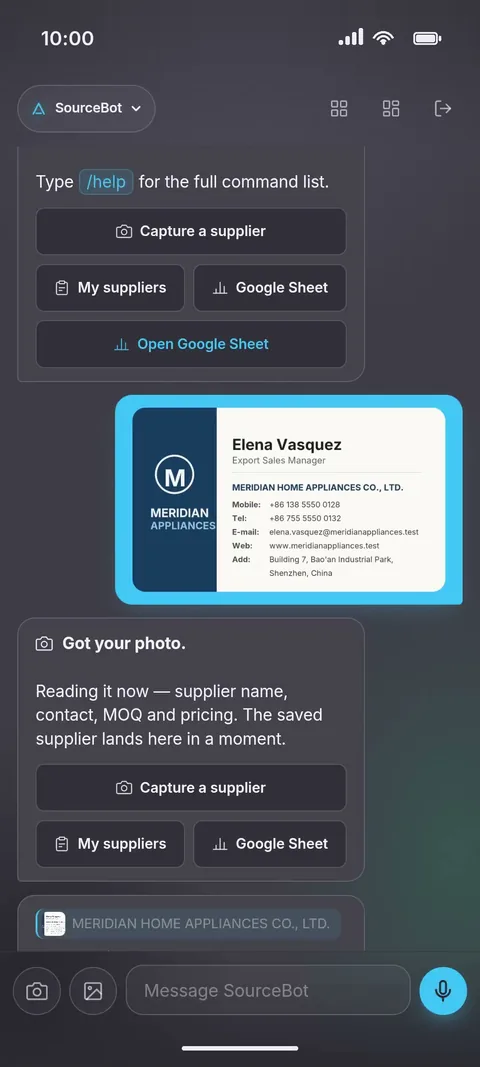
Real captures from the DaGaMa app. All companies, contacts, and amounts shown are fictional demo data.
Mockups above approximate the SourceBot experience across channels. Email addresses and sender names are blurred for privacy.
Frequently asked questions.
Does SourceBot work in WeChat — including inside mainland China?
Yes, with a smaller toolkit today. On WeChat, SourceBot captures supplier business cards, lists your recent suppliers, and opens your Google Sheet — and it connects where nothing else does inside mainland venues like Canton Fair and Yiwu. Product photos, voice quotes, and email follow-up on WeChat are still rolling out; for those flows use Telegram, WhatsApp, the DaGaMa app, or your dashboard. Every channel writes to the same Google Sheet, so mixing channels loses nothing.
How well does the OCR handle Chinese, Japanese, Korean, Arabic, and Hebrew supplier cards?
SourceBot reads non-Latin scripts with DaGaMa Intelligence's vision model. Mandarin and Japanese cards are read natively, without transliteration — you get the original characters in your sheet.
What if a supplier writes the price on the back of the card?
OCR reads the back of the card if you photograph both sides — but a voice note while the supplier is quoting is far more reliable than handwriting. Hand-written prices on cards are the #1 source of lost-quote complaints we hear from buyers.
Can I assign sub-buyers to look at the same sheet?
Yes, for viewing. Share your sheet with your team and they see every supplier land in real time. Each SourceBot account writes to its own sheet today; team accounts that capture into one sheet are planned.
How does SourceBot help with supplier vetting and AQL?
SourceBot captures the supplier — it does not vet them. For factory vetting (BSCI, SMETA, ISO 9001) we surface the supplier row inside the DaGaMa dashboard with a vetting checklist you can run before placing the first PO. The vetting workflow is described in our internal sourcing playbook; request the current version via our contact form at hidagama.com/contact.
How do I correct a supplier card OCR mistake or add details to a product scan after the fact?
On Telegram, reply directly to the SourceBot confirmation message for that supplier or product with the correction in plain language — "Factory name should be Shenzhen Bright Star not Bright Stop", "this product MOQ is actually 1k not 500" — and SourceBot updates the same Sheet row without duplicating the entry; reply "delete" to remove it, with an undo. On WhatsApp, typed details right after a product photo fill its price, MOQ, and lead time. On WeChat, edit the row in your Google Sheet or from the dashboard — it is your sheet, edits there are the record.
How is SourceBot different from sourcing apps that came before it?
Older sourcing apps either lock data into the app or require a desk-based workflow at the end of the day. SourceBot lives inside Telegram, WhatsApp, and WeChat — the tools your team already uses on the show floor — and writes to a Google Sheet you own forever. No second sign-in for your sourcing assistant; no proprietary export format.
Can I switch channels mid-trip — start in WeChat at Yiwu, then continue on Telegram at Hong Kong?
Yes. Open your dashboard → Channels tab → "Switch active channel". DaGaMa sends a confirmation prompt to your current channel; tap confirm and SourceBot follows you to the new one. Useful when you cross borders mid-trip — WeChat is mandatory inside mainland China but most buyers prefer WhatsApp once they're back in Hong Kong or Singapore. Your suppliers, products, voice notes, and Sheet all stay the same.
I need help — how do I contact support?
Type "/support" in any channel (Telegram, WhatsApp, WeChat, or the web chat). The bot asks for your issue in the next message and opens a ticket. A real person replies within the hour. On the website, the floating Helper widget in the corner answers common questions instantly with personalized context if you're signed in.
Source your first supplier.
Sign up with your email. SourceBot is ready in Telegram, WhatsApp, and WeChat within 30 seconds. The first 24 hours are unlimited and free — every supplier, product photo, and voice quote stays in your Google Sheet forever.
Last updated 2026-09-03. Questions? Contact us